
Implement Google Gemini in Google Workspace.
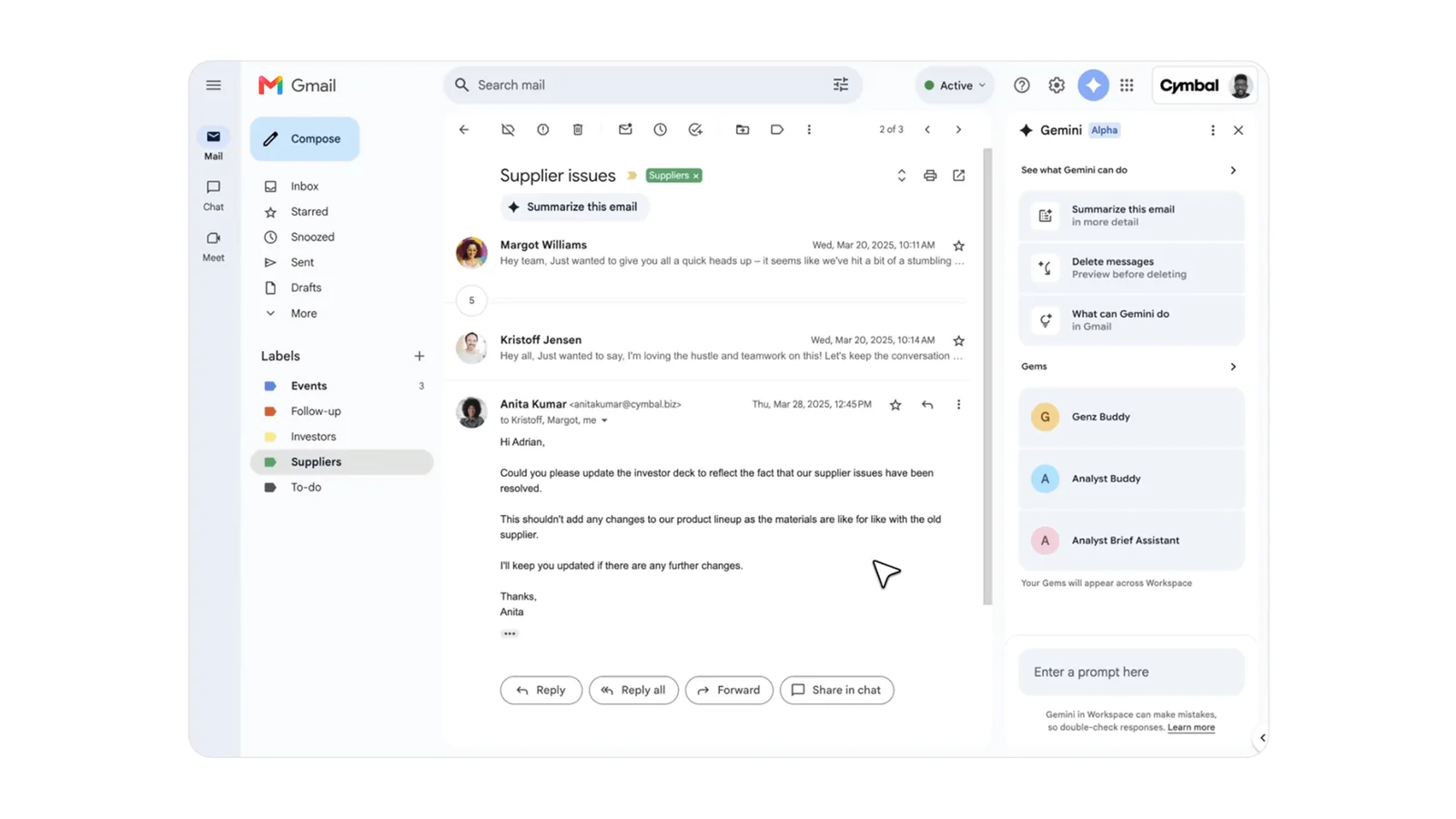
Astra Applications sets up Google Gemini for Fort Wayne and Northeast Indiana organizations that run on Google Workspace. We review your edition, admin settings and Drive sharing, then build role-based workflows in Gmail, Docs, Sheets and Meet and train staff on examples from their own work. A sender or author reviews every draft before it goes anywhere.
The problem we solve
Gemini can draw on any file a user can open, so untidy Drive sharing matters. And without examples tied to real tasks, people often try it once and go back to old habits.
- Businesses and nonprofits standardized on Google Workspace
- Teams that collaborate heavily in shared Docs and Drives
- Admins who turned Gemini on and want people to use it well
Where it earns its place
- Workflow 01
Inbox triage and replies
- When
- Routine requests pile up in a busy inbox.
- What happens
- Staff use Gemini in Gmail to summarize threads and draft replies that follow a tone guide you approve.
- Human review
- Every reply is read and edited by the sender; nothing auto-sends.
- Workflow 02
Collaborative document drafting
- When
- A team builds a grant, proposal or plan together.
- What happens
- Gemini in Docs drafts sections from an outline and referenced files, so collaborators start from structure rather than a blank page.
- Human review
- Section owners verify facts and figures before the document is shared externally.
- Workflow 03
Sheets analysis and meeting notes
- When
- A recurring meeting reviews the same spreadsheet.
- What happens
- Gemini helps summarize the sheet beforehand, and meeting notes features capture decisions where your plan supports them.
- Human review
- The meeting owner confirms decisions and numbers in the notes.
How one task flows
Illustrative example, not a client result. This scenario shows the shape of the work. It does not describe a real client, deployment or outcome.
- Customer thread
- Shared doc
- Sheet
- Suggested reply
- Co-drafted document
- Draft reply
- Updated doc section
- Sheet notes
ScenarioA nonprofit development team drafts a foundation grant.
- 1. Input
Funder guidelines PDF, last year's report and an outline in Docs.
- 2. Steps
- The writer asks Gemini in Docs to draft the need statement from the outline and referenced report.
- Gemini produces a draft section with placeholders where data is missing.
- A colleague asks Gemini to compare the draft against the funder's criteria.
- 3. Example output
A draft section and a checklist of criteria not yet addressed.
- 4. Review point
The program lead inserts verified outcome figures and approves the section.
Implementation deliverables
- 01Workspace settings review for Gemini features and organizational units
- 02Drive sharing clean-up priorities
- 03Role-based workflows for Gmail, Docs, Sheets and Meet
- 04Tone and usage guidelines
- 05Training sessions and reference cards
Client handoff
You own the result. At handoff you receive:
- Admin notes on which features are enabled for which groups
- Workflow library with examples
- Internal champion trained to support colleagues
From discovery to rollout
- Phase 01
Discovery
We review your Workspace edition, admin settings and sharing patterns and pick pilot teams.
- Phase 02
Scoped pilot
A pilot group adopts two or three workflows on real work.
- Phase 03
Rollout
We enable features for more groups and deliver training.
- Phase 04
Optional improvement
Optional: refreshers and new workflows as Google adds features.
Scope and pricing are set after discovery, based on what you need. Timelines depend on your systems, team availability and pilot findings.
Requirements
- Subscriptions
- Gemini features depend on your Google Workspace edition and any AI add-ons Google offers for it. Vendor subscriptions are billed by the vendor and are separate from Astra's fee unless your proposal explicitly includes them.
- Access
- A Workspace super admin or delegated admin for settings changes.
- Human review
- Senders and authors remain responsible for anything Gemini drafts.
About product capabilities: Google bundles Gemini differently across Workspace editions and updates features frequently. We confirm current availability for your edition against Google's documentation.
Related experience and services
Browse our case studies to see AI and software work Astra has delivered.
Common questions
Is Gemini the best fit for a Google Workspace company?
Usually it is the most natural fit because it works inside the apps you use. Some teams add a second tool for specific tasks; we will advise.
How much effort is required from us?
We need an admin for settings changes, pilot users willing to try Gemini on real tasks, and time for training sessions. Astra handles the settings review, workflows and documentation.
Can it use our other systems?
Gemini in Workspace works mainly with your Workspace content. Other systems may need exports, a connector where Google offers one, or a custom integration.
What does licensing involve?
Workspace and any AI add-ons are billed by Google. Astra's implementation fee is separate and scoped after discovery.
What support continues after launch?
You keep the workflow library, the admin notes and a trained internal champion. Optional ongoing improvement covers refreshers and new workflows as Google adds features.
We help your business put AI to work.
Serving Fort Wayne and Northeast Indiana. Tell us what you are trying to fix, and we will tell you plainly whether this is the right fit.